
While stepping into the smrtPhone account setup and integration process, you'll need to exchange API tokens between REI Automated and smrtPhone.
These tokens are used in two places:
During Account Creation
When creating your smrtPhone account, you'll be prompted to enter your REI Automated API Token. Once reaching the Start Trial page, click on your CRM, and you will be required to add the API Token.
In REI Automated, navigate to Settings > Phone/SMS Provider > choose smrtPhone, and scroll down until you reach Integration API Keys and copy the provided key, paste it into the required smrtPhone field, and click Connect.
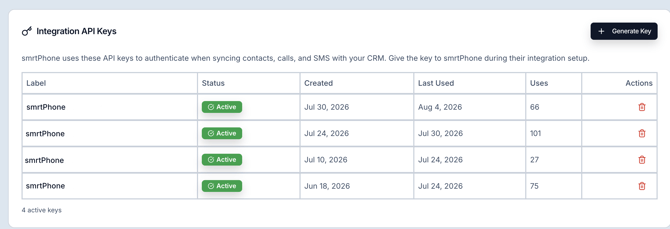
Also, in the Integration API Keys section, you need to press Generate Key, add a label, then Generate and paste that into the required smrtPhone field.
During Integration Setup
After your smrtPhone account has been created, you'll need to add your smrtPhone API Token to REI Automated.
In the smrtPhone Web App, navigate to Admin > API Tokens, then copy your API token.
Return to the Settings page in your CRM, and in the smrtPhone Configuration field, add the API Token you copied from smrtPhone.
Mapping Users
You have the option to map your smrtPhone Users with your CRM users. In the same Setup dashboard, below the options of Reinstall and Reconfigure, there is a table with all your smrtPhone users who are part of this account.
From the drop-down menu on the right, select the proper user to map. If you don't want the users to be linked anymore, head back to Admin > REI Automated Setup and click the ✖️ next to the user in the REI Automated User column, and it will be removed.
This step is required to display the call/SMS owner inside REI Automated so you can know who's making/receiving calls/texts.
Head to Settings > Departments > Phone Numbers > Sync from smrtPhone and choose which smrtPhone numbers should create opportunities from incoming/outgoing calls/SMS made to/from unknown contacts.
If you have any questions, please do not hesitate to reach out to us!

💡Contacts Page and Inbox ⇢
💡 How to remove users from smrtPhone ⇢