
Flows establish what the system should do with calls and texts that come into your phone numbers. Flows are incredibly flexible, totally customizable, and can be as complex or simple as you want.
Everyone needs a Call Flow!
If you do not have a call flow set up for your phone number, incoming communications will not reach you. Even if it is as simple as ring this user, you must tell smrtPhone what to do when someone contacts each of your phone numbers.
A Step-by-Step Guide on How to Use Flow Editor for:
📞 Incoming calls ⇢
💬 Incoming texts ⇢
How does Flow work?
Consider Flows to be a series of questions that the system asks to determine how to route the call/text. You get to program the answers—all of which will happen in an instant. When a call or text message is received on a given phone number, your smrtPhone system will search for the Flow associated with that number.
Depending on the Applets that have been used, it will ask questions such as:
-
Is this during hours or after business hours?
-
Should this caller be given a menu of options (IVR)?
-
Should we ring one person or a Team?
-
If we ring a Team should we ring them all at once or in a certain order?
-
If no one answers, should we connect to voicemail?
These are just examples. If you have a complex call flow in mind, we recommend mapping it out on paper before transferring it to smrtPhone to ensure there are no dead ends or missing branches.
This video gives an overview of the Flows Dashboard:
(Disclaimer: even if the video displays an outdated interface, the functionality is the same)
On the overview Flow screen, you will see:
-
Name of the Flow - Using a friendly name helps to keep things organized and easily understood
-
A preview of the Applets used in the call flow. Use these Applets for your Call Flow:
-
How many numbers use a call flow? As many numbers as you want can be routed through each Call Flow, however, only one Call Flow can be assigned to each number. (Otherwise, imagine an incoming call to a specific number if there were multiple flows—which would the system pick? This is why each number can only have one flow, but each Flow can be used by many numbers.)
-
Whether there is a Call Flow set up (or one needs to be)
-
Whether there is an SMS/MMS text Flow set up (or one needs to be)
Learn how to customize settings for SMS Text Flows ⇢
As it can be seen here, you will have everything in one place, all of the Call and SMS Flows:
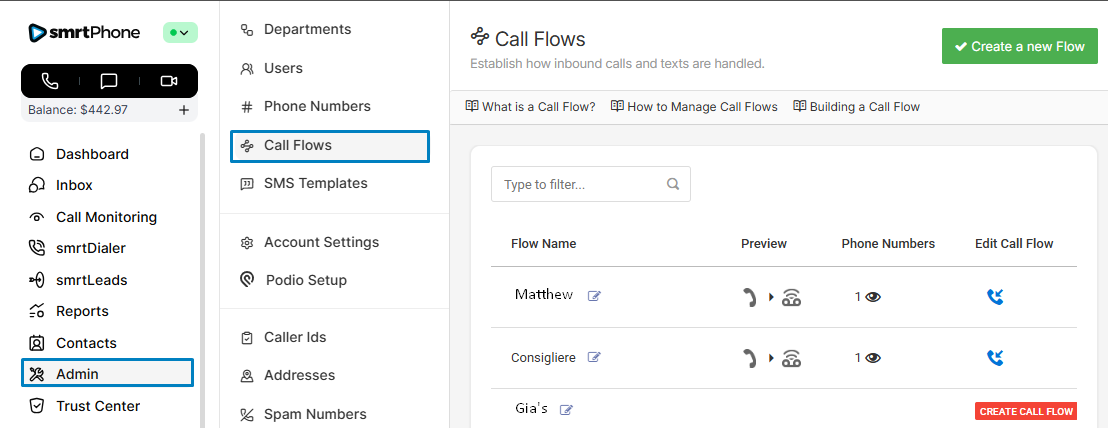
Seeing Red (Buttons) in Flows
🛑 If you see the red Create Call Flow or Create SMS Flow buttons, these should be addressed as soon as possible.
Without an established flow, an incoming call/text to this number will not be received.
The Other Way Around: from Flow to Number
If you first created a flow without assigning it a number, simply go to that particular flow and select from the drop-down menu the number you want to be associated with it.
Go to Phone Numbers, and see what flow does not have any number associated with it.
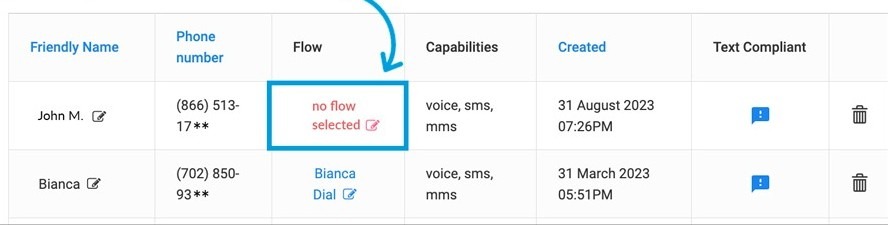
After this, simply click the red pencil and assign a flow that you previously created.
You can choose the previously created Call Flow from the drop-down menu, or you can create a new Call Flow for that number.
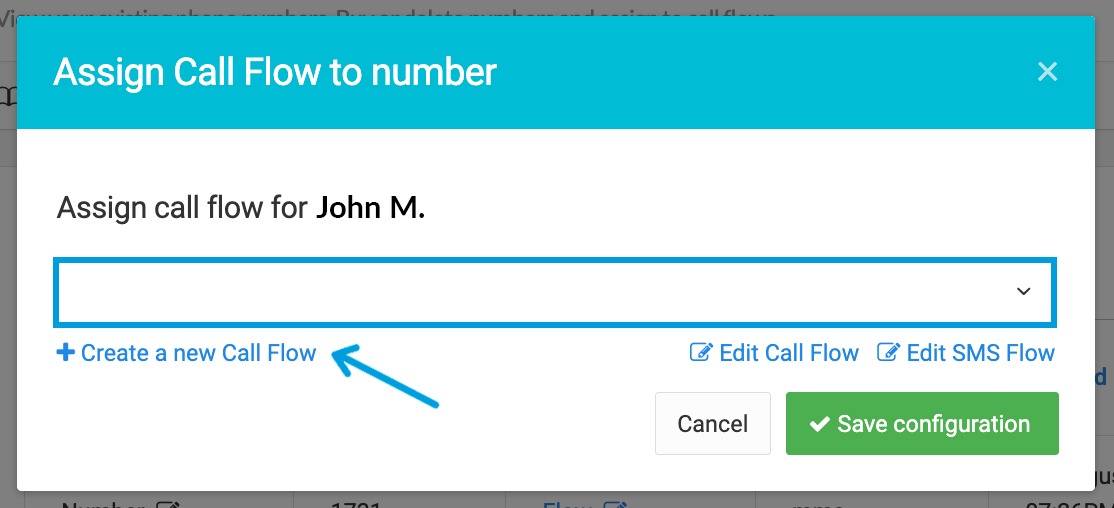
This also applies if, for any reason, you deleted the Call Flow associated with a number and now need to set it up again.
