
We have implemented the option to Trigger Webhook inside two of our SMS Applets: SMS Inbox and Save and Reply, when building an SMS Flow. Webhooks are a powerful dynamic resource in which apps (i.e. smrtPhone) can send automated messages or information to other apps.
Head to Admin > Call Flows and select the SMS Flow that you want to modify, then
drag and drop the Applet you want to use. Toggle on the Trigger Webhook button and add the link to the webhook in the box below.
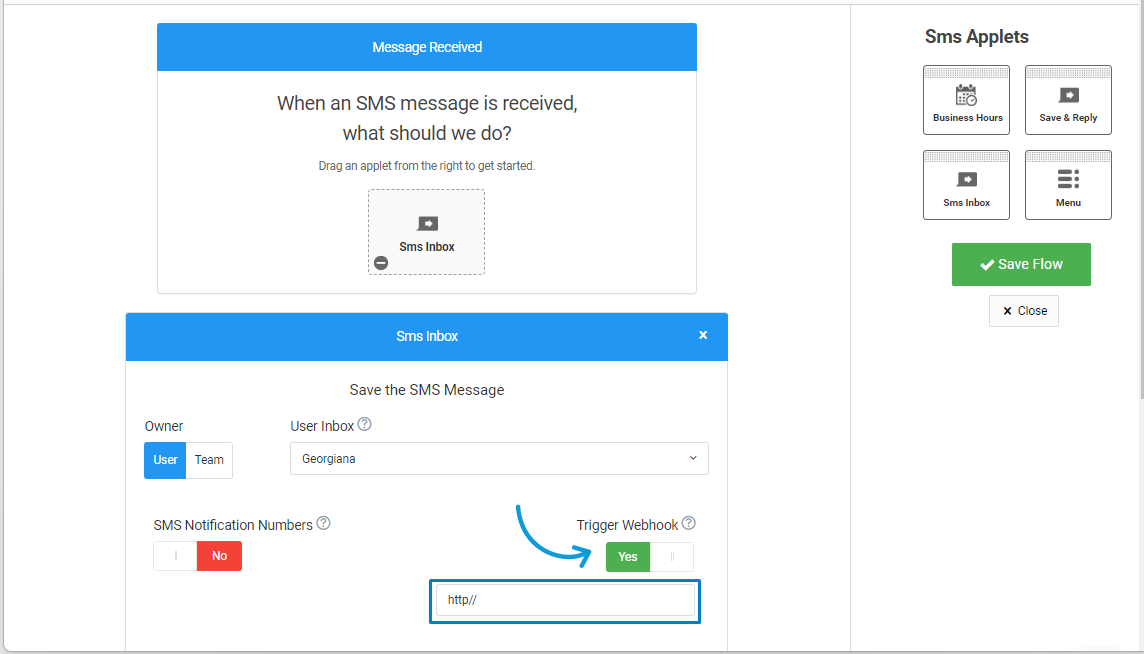
Once turned on, it will activate the trigger for an HTTP POST webhook when the message is received. It can be used with Globiflow Webhooks, for example, or other Webhooks you might want to use for your CRM.
The following variables will be sent: from, to, message.
🌐 Podio Users: This can be used to automate your work and take advantage of Podio. If you aren't sure what a webhook is or how to use Podio Workflow Automation (Globiflow), smrtPhone Customer Support can recommend Podio developers who are very familiar with smrtPhone.
