
The New smrtPhone Main Dashboard at a Glance
We've completely reimagined the smrtPhone Dashboard to deliver immediate clarity, actionable insights, and faster workflows.
Whether you're an individual contributor or an admin, the new experience is designed to surface what matters, instantly.
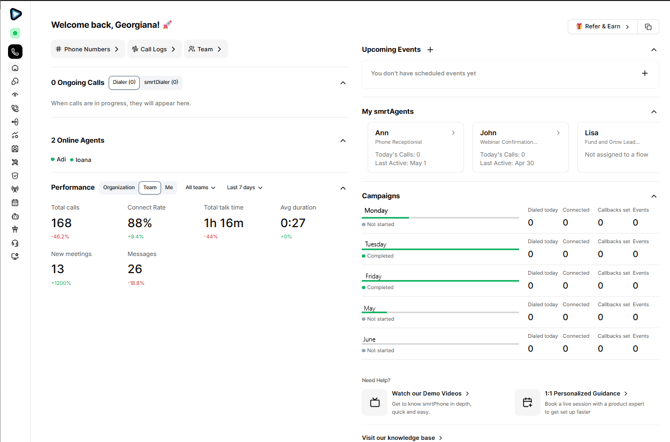
🎯 The Big Picture
Before
A generic yet functional welcome screen, with promotional content and minimal operational value.After
A personalized command center that shows real-time activity, performance insights, and direct paths to action.
✨ What’s New
| Feature | What It Does |
|---|---|
| 📊 Performance Metrics | Instantly view calls, connect rate, and talk time |
| 👥 Team Visibility | See who’s online and actively on calls |
| 📞 Live Monitoring | Monitor active calls in real time |
| 📅 Calendar | Stay on top of callbacks and follow-ups |
| 🚀 Quick Access | Jump into your most-used tools with one click |
| 🔒 Role-Based Views | See only the data and tools relevant to your role |
👀 What You’ll See
For Regular Users
- ✅ Personal performance statistics
- ✅ Recent call activity
- ✅ Assigned campaigns
- ✅ Quick access to Inbox and Dialer
For Account Owner and Users with permissions
- ✅ Live call monitoring across the team
- ✅ Organization-wide performance metrics
- ✅ Campaign controls and analytics
- ✅ smrtAgents management tools
🚀 How to Get the Most Out of It
- Start here first
The Dashboard gives you a full daily snapshot in seconds. - Track trends, not just numbers
Green indicators signal improvement - use them to guide decisions. - Use chips for navigation
Skip menus. Jump directly to what you need. - Drill down instantly
Clickable tabs and detailed reports.
The new dashboard gives you everything you need at a glance - call stats, voicemails, active lines and users, and quick access to settings. You spend less time hunting for info and more time growing your business.
Navigation Menus and all Dashboard tabs are detailed in our documentation, so you can check it out and see how everything works, step by step. Click the links below! 😉
