
✨ Meet Your Agents
The Inbound AI Agents - are now live in Beta, adding a powerful intelligence layer to your call flows.
When your team is unavailable, smrtAgents answer immediately, collect the right information, and move the call forward based on your predefined rules.
They work as a step inside your call flows, alongside menus, routing, voicemail, and SMS. They handle early-stage interactions - qualifying leads, collecting details, routing calls, setting Do Not Call preferences, scheduling meetings, or triggering webhooks - and pass conversations to your team when needed.
This article covers information about:
smrtAgents' Identity Role assignment
Acquisitions Specialist's Playbook and Responsibilities
Property Management Maintenance Agent's Playbook, Knowledge base, and responsibilities
Customize a Call Flow for an agent
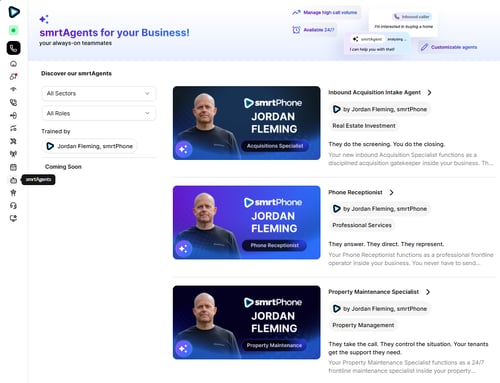
Hire a smrtAgent
Go to Admin Dashboard > smrtAgents. Currently, smrtPhone offers three agents:
-
Inbound Acquisition Intake Agent – Handles inbound seller calls, collects key information naturally and without pressure, qualifies the seller, and routes the call to the right next step.
-
Property Management Maintenance Agent – Acts as the first response for tenant maintenance calls, captures essential details, and routes issues based on your escalation rules.
-
Phone Receptionist – Answers calls within one ring, has access to conversation history, and routes callers based on your preferred handling and enquiry types.
Review each agent’s identity and purpose, then choose the one that fits your needs.
Please read the AI Terms of Service and AI Privacy Policy before agreeing to them.
To hire, activate editing, or retire agents, you must be granted the necessary permissions.

You can test any agent before deciding. Click Start a test call to experience live, or hire instantly if you're ready to unlock the benefits.
Each agent has a distinct persona, built for specific use cases and equipped with different tools and capabilities. Choose the one that fits your workflow. Pricing varies based on schedule — full-time or part-time, and the agent's abilities.
After hiring, you can fully customize the agent’s identity and behavior. While the setup framework is consistent, each agent’s Playbook and functionality are tailored to its role.
Customize Role
The Agent's Identity role assignment is the same for all agents. Behavioral differences are defined in the Playbook.

-
Agent's Name - Name your smrtAgents naturally, considering they will be the first responder
Language - Choose the language: English (Spanish - coming soon)
-
Voice - Choose among different pitches and tones. Listen to each and choose your favorite or the one that suits your style best
-
Company Identity / Select identity- Select an existing company identity or create a new one
-
Conversation Introduction - Is the first impression the agent can make for your business. The introduction is crucial, so please choose the right speech. The agent will read and deliver your message in a natural, welcoming tone.
-
Conversation Closure - Type a text for your agent to read to your caller at the end of the conversation. The smrtAgent will not improvise the Introduction and the Closure, the agent will read both the conversation introduction and the closure word by word, so it's up to you to write them as you like.
-
Fallback User / smrtPhone user - If a technical issue occurs, calls can be routed to a selected smrtPhone user. You can pick them from the drop-down menu available here.
-
Save selection and hire your agent. They will appear in your Agents list.
Customize smrtAgents roles
Each customization option includes a Playbook tailored to the agent's role, which is a high-quality tool to ensure you provide the proper context and information for them to act accordingly, as trained.
Each input is AI-verified for accuracy and must match the specific field requirements. Follow the field descriptions and examples carefully. Entries that do not follow the required format may be rejected and require revision.
1. Inbound Acquisitions Intake Agent
Playbook
This agent handles inbound seller calls, gathering information, scheduling meetings, or creating contacts. Their Playbook customization contains:
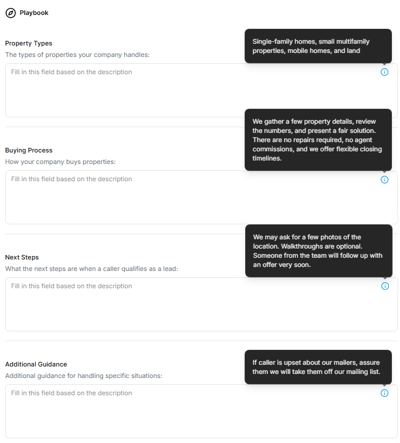
Property Type information - Specify what types of properties your company handles
Buying process details - Briefly describe your buying process, how your company handles the buying steps
Next steps - If / when a lead is qualified, specify what the next steps are in the process
Additional guidance: Provide additional instructions to guide the agent’s responses when callers hesitate or object
Responsibilities
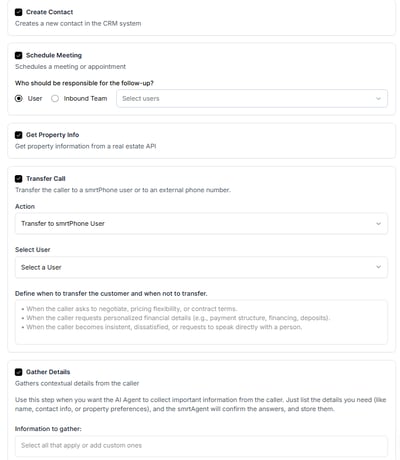
Choose the tools your agent can use during calls to perform tasks or hand off conversations when needed:
-
Create contact - The smrtAgent will create a contact for you
-
Schedule a Follow-up Meeting - When the caller requests a meeting or appointment, the agent accesses the account's calendar for proper scheduling. Select an agent or team to be responsible for the meeting, and they will receive a notice before the event. At this moment, smrtPhone links only with Google Calendar.
-
Get Property Info - This will populate the contact with the property information available in the conversation, both from the API and from the caller's details
-
Transfer Call - You can set a smrtPhone or an external phone number to be available when the caller asks for a transfer
-
Gather Details - Specify to your smrtAgent which information is relevant to gather during the conversation. You can choose from the default available or create custom ones
2. Property Management Maintenance Agent
Playbook
This agent's Playbook offers the option to take actions after the call, sending a text message and/or triggering a webhook, depending on the issue's maintenance level. 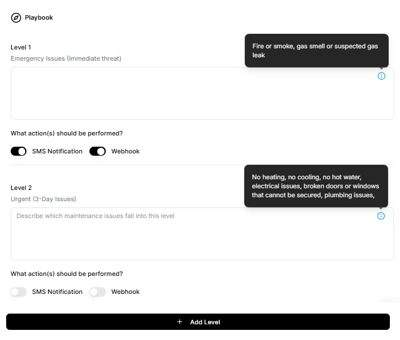
This agent handles calls from existing tenants and can use information already stored in your system.
Knowledge Base
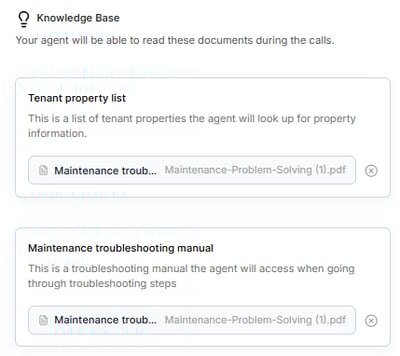
Use the Knowledge Base to provide documents that are useful during a conversation, such as a property list or a troubleshooting manual you already have. Please follow the required format to ensure accurate responses.
Responsibilities
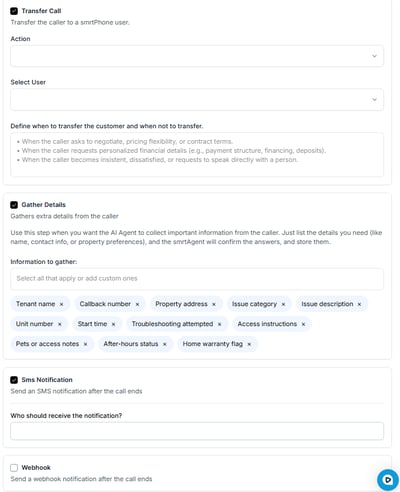
-
Transfer Call - Transfers the current phone call to a smrtPhone user or a group. Select to whom this call is transferred
-
Gather Details - Gathers extra details if they are not already in your system, and confirms the information that you already have
-
SMS Notifications - After the phone call, they can send an SMS notification to a number you add
-
Webhook - After the call, they can trigger a webhook
3. Phone Receptionist
This agent’s Playbook is designed to mirror a professional receptionist, based on user context. They can act on up to 10 enquiries you configure, each with multiple actions.
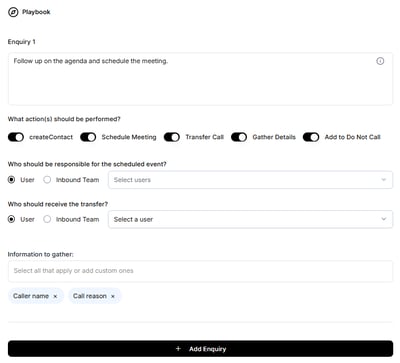
This agent can create a contact, schedule a meeting, transfer the call, gather details, and add a contact to the DNC list.
Customize Call Flows
To add the agent to a call flow, go to Call Flows and insert the AI Agent step.

Alternatively, you can purchase a new phone number on the spot while configuring your smrtAgent and start customizing their call flow.
Learn more about customizing your flow with smrtAgents ⇢
How does this work
Inbound calls follow the flow you configure. Agents can be updated at any time, except during active calls. You will get the conversation's outcome in your system:
-
Added a contact to DNC - When a caller explicitly asks not to be called again, their phone number will be added to the Do Not Call List.
-
Created a Contact - Will create a contact based on the phone number of the caller
-
Gathered information - Will collect the specific information you trained them to do, in the exact format you requested.
-
Scheduled a follow-up meeting - Will schedule a meeting or an appointment based on your specific instructions, with the right pre-set user, at the right time available
-
Send an SMS or trigger a webhook - Will send a text message or trigger a webhook for a particular event
Suspend or Retire Agents
Suspend an agent
You can suspend an agent at any time from your Agent list. Suspending an agent means you can configure another one without losing the current subscription for the agent.
Once suspended, an agent cannot be reinstated; they are deleted. This means you have to reconfigure call flows to avoid call loss. You can configure up to 5 agents.
Retire an agent
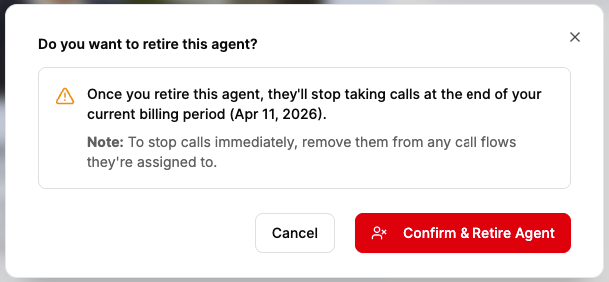
Retire an agent from your Agent list by accessing Manage Subscription. Retiring an agent means that you no longer need them. You can change your mind and bring them back until the next renewal date.
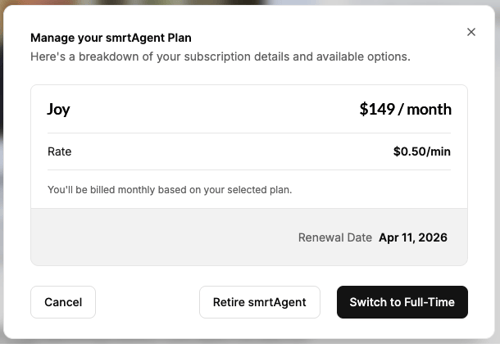
During this period (until the due date) they can still get phone calls.
Agent's Activity
View agent performance from the Agents Dashboard. You can see how many calls they handled, transfers, scheduled events, and also details on calls.

These call details are also visible in Call Logs. If you are searching for specific calls or agents, you should use the filters available in the Call Logs dashboard.

Usage and costs
You can view all costs on your usage page at any time. You can see billing information only from the Manage subscription page available on each agent, but not in the Product page at this moment.
Price will vary depending on the agent's role. Each agent has their rate.
| smrtAgent |
Part-time subscription |
Full-time subscription |
| Inbound Acquisition Intake |
$ 149 / month $ 0.55 / min (call rate) Pay as you go |
$ 897 / month 2000 min included $ 0.55 / min overtime rate, after the established limit |
| Receptionist |
$ 99 / month $ 0.40 / min (call rate) Pay as you go |
$ 647 / month 2000 min included $ 0.40 / min overtime rate |
| Property Maintenance Specialist |
$ 397 / month $ 0.50 / min (call rate) Pay as you go |
$ 1547 / month 3500 min included $ 0.50 / min overtime rate |
Learn more about how much it costs to communicate from smrtPhone ⇢
Your feedback matters to us, so please head up to your smrtAgent and share your thoughts! ✨
