
When comes to campaigns, we are talking about 2 different actions:
-
Achieve - The action can be undone
-
Delete - Permanent action
Achieve - The action can be undone
Delete - Permanent action
Archiving smrtDialer Campaigns
If you archived your campaign and want to re-use it, you can go back and search within Archived Campaigns and press the Restore button. It's the option furthest to the right on each campaign.
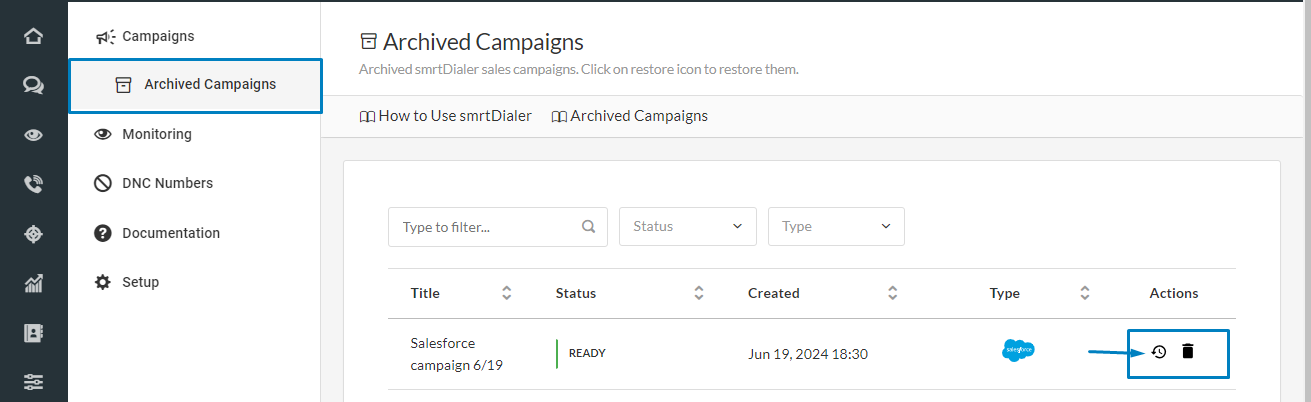
After choosing this option, just confirm your choice.
-2.png)
Now you can find this newly restored campaign among the other campaigns in your smrtDialer.
Deleting smrtDialer Campaigns
Once you archived the campaign, you can find it, as mentioned above, in the Archived Campaigns tab.
When you are in this tab, you can also definitely delete a campaign. On the right side, you have the Actions buttons. You can restore or delete it. If you decide to delete the campaigns, hit the trash can icon 🗑️ and confirm your action.
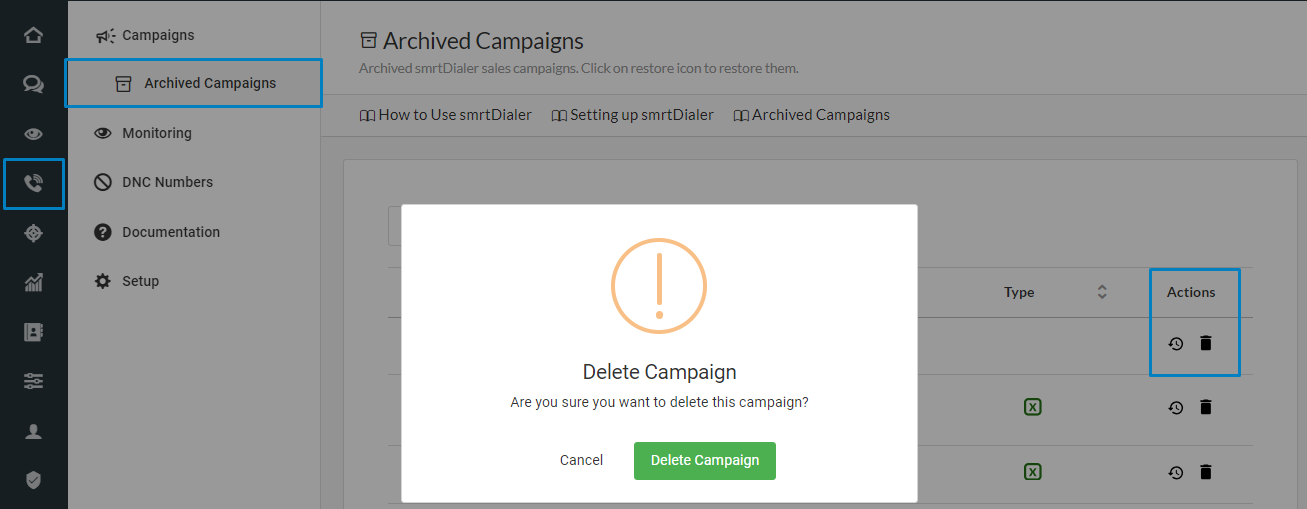
Once confirmed, a pop-up shows up, informing you that the campaign was deleted.
If archived campaigns can be restored, deleted campaigns cannot be retrieved, so we advise you to check the campaign before deletion to be sure you don't need it anymore.
