
The Account Owner of a smrtPhone Account can remove any user from any team, as well as remove them entirely from smrtPhone.
Certain Activity Management User permissions can also be granted to allow other users, besides the Account Owner, to have the same capabilities.
Learn how to manage users and teams ⇢
It's easy to remove a user from your smrtPhone Account, via these 5 steps: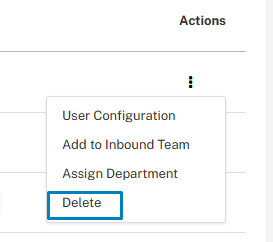
-
Go to the Admin panel (≡) from the left navigation
-
Click on Users from the menu
-
Find the User you wish to remove
-
Click the 3 dots next to your user and select Delete
-
Confirm that you wish to remove them
When you remove a user, it's helpful to double-check that all Call Flows and SMS Flows will continue to function as intended.
If there were any Call Flows or SMS Flows that named the deleted user, you'll need to update those flows, or incoming calls and texts may not be received.
Learn more about the Flow Builder ⇢
Keep in mind that when you remove a user from smrtPhone, this action does not delete them from your CRM as well. You need to take an extra-step to also exclude them from your CRM, if this is what you wish for.
