
An alternative to crafting a new call flow from a blank slate is copying an existing call flow and making adjustments.
Learn more about Inbound Communications ⇢
When to duplicate instead of building new
Duplicate when the flow you need is a variation of one you already have:
- Same routing, different user or team
- Same structure, different business hours
- A working flow you want to experiment on without touching the original
Build from scratch when the routing logic itself is different — duplicating then re-picking every applet is slower than starting clean.
Steps
Go to Admin > Numbers & Flows and locate the flow in your list.
1. Find the Call Flow you want to copy
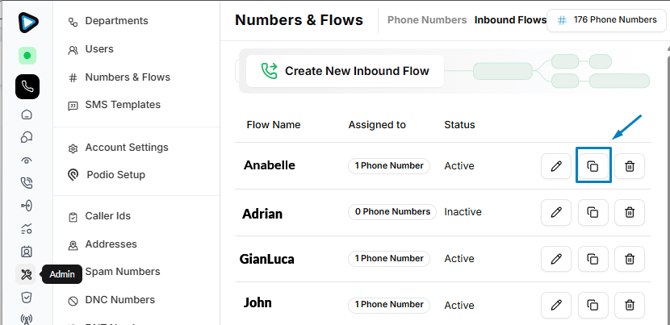
2. Select the duplicate action on that row
3. Confirm the copy
You will find your duplicated call flow among the other, and it appears in your Flows list as [Original name] - copy.
You can also make your adjustments - Change whatever the new flow needs: the applets, the users, the schedule.
Please keep in mind that:
- The copy is independent. Editing it never affects the original.
- The copy starts unassigned. A duplicated flow isn't live until you assign it to a phone number.
- It won't be at the bottom of the list. Flows are listed alphabetically at this moment, so the copy appears among the others — usually right beside the original. You can also use the search bar to find it more easily!
