
There are a range of permissions users within smrtPhone can have, set by the Account Owner.
The structure is simple:
-
Account Owner
-
Users with different permissions
Users can have customized permissions, some of which allow for global changes, depending on what the Account Owner has granted.
There can be only one Account Owner.
Changes Only Account Owners Can Make
-
Complete and submit Identity Verification
Only the current Account Owner can transfer account ownership to another user on the account.
When an Account Owner transfers ownership to a new user, they have to be sure that this user has all permissions granted in their CRMs - they have to be an Admin (or the equivalent role) with full permissions in the CRM.
How to Change Account Ownership
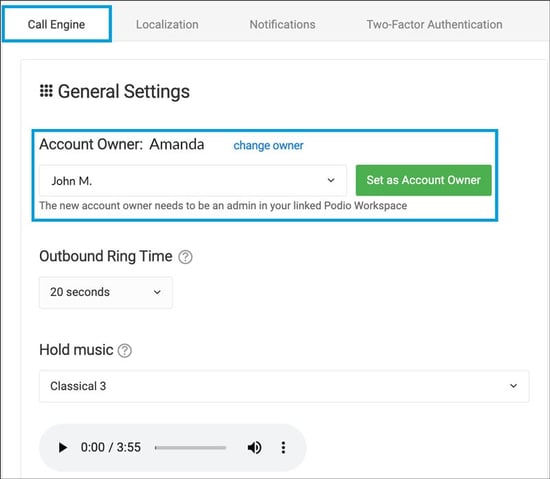
-
Go to the Account Settings section of the Admin panel
-
Under the tab General Settings, it shows the current Account Owner
-
Press the blue Change Owner button
-
Select the new Account Owner from the drop-down menu
-
Confirm the update by clicking the green Select as Account Owner button
The only way to regain the role is to have the new Account Owner profile given back.
