
Overview
E911 for Digital Numbers enables emergency (911) calls placed from a Digital Number to be routed to the appropriate emergency dispatch center along with the caller's registered emergency address.
This feature helps organizations comply with emergency calling regulations while ensuring users can be accurately located during an emergency.
How It Works
To enable E911 for a Digital Number:
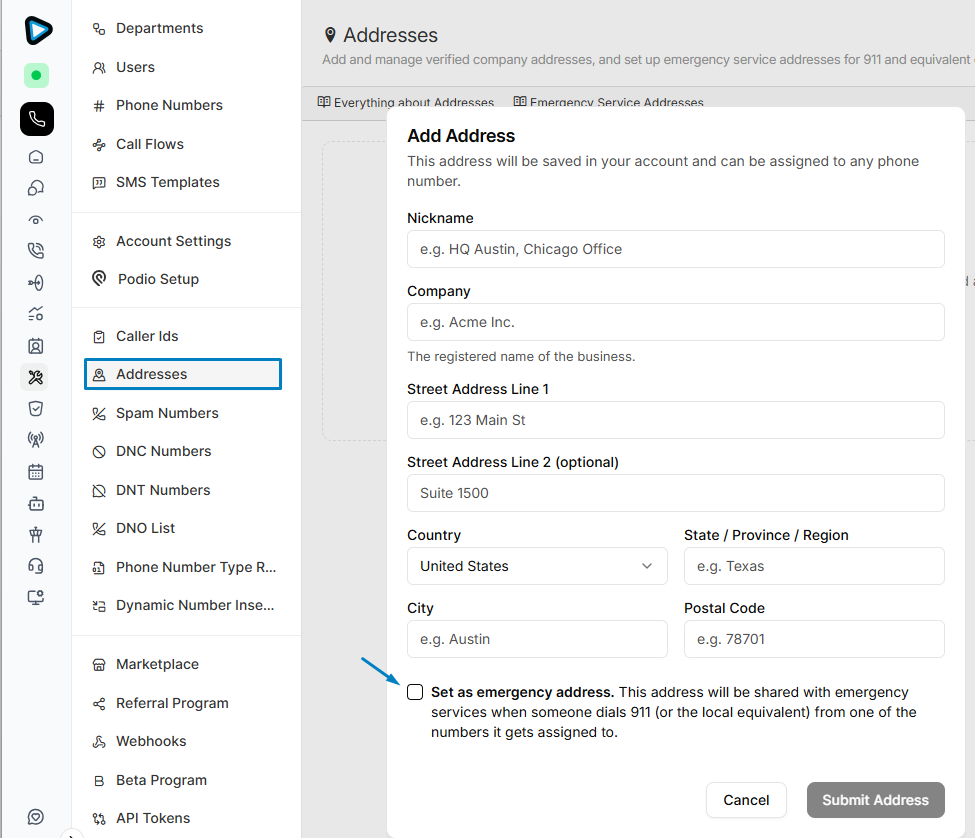
- Create an address under Admin > Addresses.
- Mark the address as an Emergency Address.
- Save the address to submit it for carrier validation.
- After the address is successfully validated, assign one or more Digital Numbers to it.
Important Information
- Emergency addresses must exactly match the carrier's address database to be validated.
- Formatting differences (such as abbreviations, capitalization, or street naming conventions) may cause validation to fail.
- A single emergency address can be assigned to multiple Digital Numbers.
- Each Digital Number can be associated with only one emergency address at a time.
Only validated emergency addresses can be used for E911. If an address fails validation, review the formatting and ensure it matches the carrier's records before trying again.
