
smrtPhone takes user input very seriously, and we love to innovate based on what you actually need day-to-day for your business.
Making a Feature Suggestion is easy. Head to your smrtPhone Dashboard in the Web App and click What's new.
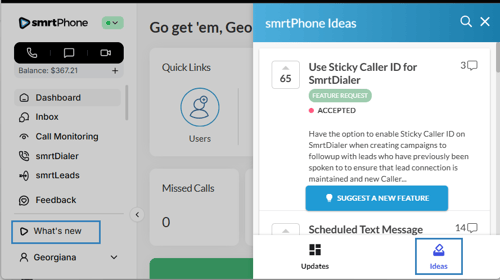
From here, a banner will pop out from the right-hand side of your screen. You'll see a What's new on smrtPhone tab. Here, you can catch all the new things that are happening in smrtPhone, the updates, the ideas that were once feature requests and are now under review by our management team, or even implemented, and also the button to suggest a new feature.
From this tab, you'll see an option to Suggest a New Feature. Give it a simple, descriptive title and any further descriptions of what you'd like from the feature. You have the option to upload images that will help us understand your request. Click Submit when you're done!

From the What's new tab > Ideas, you can also view and comment on other users' feature requests. This is an opportunity to voice your support for other users' ideas!
smrtPhone updates Requests with Accepted and Live tags so that you have transparency into what we're working on.

